# Saldo del Ejercicio

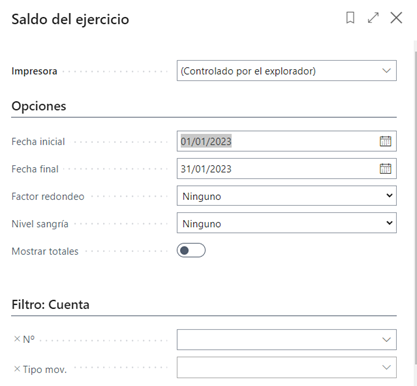
<span style="font-size: 10.5pt; line-height: 107%; font-family: 'Segoe UI Light',sans-serif; color: #171717; background: white;">El informe presenta el saldo de cierre de las cuentas contables seleccionadas al final del ejercicio anterior. Además, muestra el ejercicio hasta esta fecha, el ejercicio al final del periodo seleccionado y el saldo al final del periodo seleccionado, excluidos los movimientos de cierre. El informe se puede utilizar en el cierre de un periodo contable o un ejercicio.</span>

<span style="font-size: 10.5pt; line-height: 107%; font-family: 'Segoe UI Light',sans-serif; color: #171717; background: white;"><span style="font-size: 11.0pt; line-height: 107%; font-family: 'Segoe UI Light',sans-serif; mso-fareast-font-family: Calibri; mso-fareast-theme-font: minor-latin; mso-ansi-language: ES; mso-fareast-language: EN-US; mso-bidi-language: AR-SA;">Se debe incluir la Fecha Inicial y Fecha Final del periodo.</span></span>

<span style="font-family: 'Segoe UI Light',sans-serif;">Factor de redondeo si se requiere ver importes en miles.</span>

<span style="font-family: 'Segoe UI Light',sans-serif;">Nivel de sangría se usa para planes de cuentas configurados como Inicio Total .. Fin Total.</span>

<span style="font-family: 'Segoe UI Light',sans-serif;">Mostrar Totales: Especifica si se desea que se muestren TOTALES al final del informe.</span>

<span style="font-family: 'Segoe UI Light',sans-serif;">![](https://docs.grupodynasoft.com/uploads/images/gallery/2023-08/embedded-image-3ojkrcgh.png)</span>

<span style="font-family: 'Segoe UI Light',sans-serif;">![](https://docs.grupodynasoft.com/uploads/images/gallery/2023-08/embedded-image-hpov8xc4.png)</span>