# FEATURES ENTERPRISE
Dynasoft inlcuye una serie de desarrollos que no contempla BC Estándar y que por su complejidad de incluye en este apartado.
# FEATURES ENTERPRISE
#### IMPORTES EN ALBARANES DE COMPRA Y VENTA
Incluir importe en albarán venta y compra.
Nuevos report albarán venta con importe.- Estándar Features
#### MARGEN CALCULADO en línea de pedido de Venta
Crearemos:
\*un campo en borradores e históricos que muestre el precio coste (real en históricos, estimado en borrador)
\* un campo en borradores e históricos (calculado en borradores) cuya fórmula será:
((PRECIO VENTA - PRECIO COSTE) /PRECIO VENTA)\*100.
Para el precio coste:
· En borradores emplearemos el campo de la ficha producto Coste unitario (precio medio)
· En histórico emplearemos el campo de Importe coste del mov.valor. (que es el coste real)
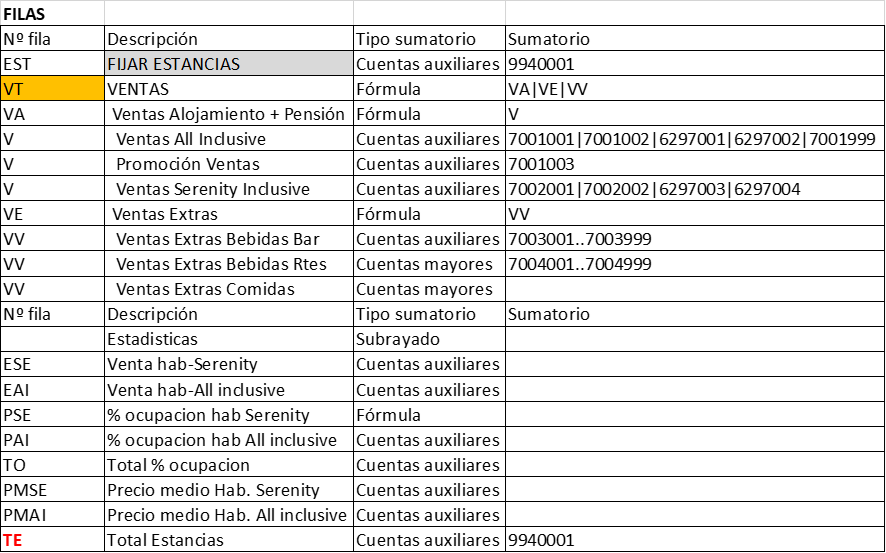
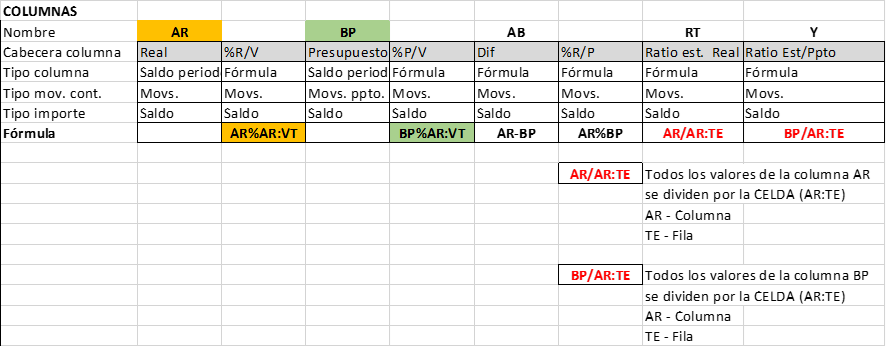
#### ESQUEMA CUENTAS (Informes Financieros): Opciones de calculo adicionales al estándar.
Poder trabajar como un excel (operaciones adicionales como multiplicaciones o divisiones)
Cómo trabaja:
Permite en las filas de los informes financieros usar este nuevo operador ":" como fórmula.
Se usa de la siguiente manera: Columna:Fila
A partir de las columna y fila seleccionada, recoge el valor de esta.
Siendo columna el **Nº columna** de la columna que se encuentra en la definición de columna usada en ese informe financiero.
Y siendo Fila el **Nº fila de la fila** que se encuentra en la definición de fila seleccionada en ese informe financiero.
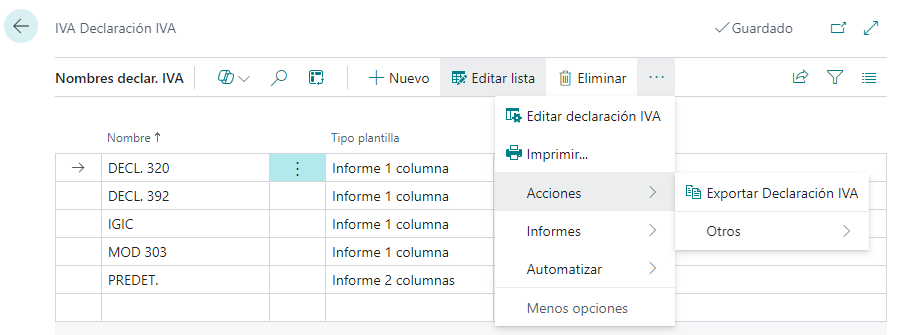
##### EXPORTA DECLARACIONES DE IVA A OTRAS EMPRESAS
Permite EXPORTAR declaraciones de IVA
[](https://docs.grupodynasoft.com/uploads/images/gallery/2024-08/wSDimage.png)
##### BLOQUEO EDICION DE INFORMES FINANCIEROS Y DECLARACIONES DE IVA
Se incluye el campo EDITAR LISTA en la cinta de opciones para que no se modifiquen los informes de forma involuntaria. Por defecto se muestra la lista bloqueada.
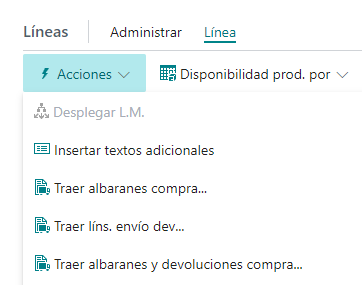
##### CREACION DE FACTURAS DE COMPRA SELECCIONANDO TANTO ALBARANES DE ENTREGA COMO DEVOLUCIONES
BC Estándar no permite rescatar albaranes enviados y devoluciones para un mismo documento. BC está diseñado para rescatar los albaranes enviados para generar la Factura y loas devoluciones para generar los documento de Abono.
[](https://docs.grupodynasoft.com/uploads/images/gallery/2024-08/qv9image.png)
##### TEXTO PARA PIE DE FACTURA EN FACTURAS/PEDIDOS/OFERTAS DE VENTA
Configuración de Ventas y Cobros
[](https://docs.grupodynasoft.com/uploads/images/gallery/2024-08/c7bimage.png)
##### CONVERSION DE ALBARANES DE COMPRA EN DEVOLUCIONES & VICEVERSA
Conversión de Albaranes de Compra en Devoluciones y Devoluciones en Albaranes.
Histórico Albarán Compra --> Convertir a Envío de Devolución
[](https://docs.grupodynasoft.com/uploads/images/gallery/2024-08/TY8image.png)
Histórico Envío Devoluciones --> Convertir en Albarán de Compra
[](https://docs.grupodynasoft.com/uploads/images/gallery/2024-08/f4Yimage.png)